MYLES COLEMAN - PROGRAMMING FMP

Rationale
So far in this college year I have mainly enjoyed the programming side of this course. Because of this I have decided to focus my education and my project on the programming side. Attempting to make a game as this is where my expertise best suits and what I enjoy the most. This sentiment mirrors what I would like to do in the future for a job, working in the games industry as a gameplay programmer. As this side of programming has you working in a side of the game which is very visual and I feel rewarded once you see the final product.
Project Concept
For my project I plan to create a 2D platformer game using Unity (C#). For the game there will be many premade rooms containing both hazards such as spikes as well as enemies such as snakes (to move back and forth on a platform). Each room will have many doors used to leave the room, these doors will lead to more randomly selected rooms. The game would end when you die, creating a gameplay loop that’ll help to engage the user keeping them playing. There will be many different items that affect how you play the game, for instance increasing stats and providing certain buffs and negatives. Also there will be a ranged combat that uses a gun. This gun will have a certain amount of ammo for every few rooms. This will ensure the resource is used sparingly. Perhaps you could find ammo in rooms, to increase your count. Now for the aesthetics of the game I don’t plan on creating any. As I plan on becoming a gameplay programmer in the future I won’t be focusing this project on design or aesthetics. The game will use simple blocks coloured in ways which get the point across. This saves me time allowing me to work on bettering my code. With all this in mind I feel the game will be suitable for 10~ year olds plus, due to its simple gameplay and lack of dangerous themes.


Evaluation
Thanks to doing computer science in secondary school and past programming units in college, I have gained some skills which will prove useful in completing this project. For instance in secondary school I gained knowledge in the programming language Python, this is has similarities to C# namely in its syntax. My skills in Python were further developed in college (by creating a text based adventure game), I gained an understanding of many different functions that would help me in creating this project. But they also aided in my understanding of c# due to the aforementioned similarities thus helping in my jump from Python to C#. My education on C# didn’t stop there however, I created a game similar to flappy bird and a simple racing game within Unity both of which used C#. Due to this my understanding and skills within the language will definitely help in creating this project. The experience will go a long way. As my game will lack created assets for style, my units in this won’t be of much benefit. However I will keep in mind what I did learn in case there is time for quick assets at the end. Nonetheless in all of these units a good amount of planning and research was necessary to ensure those projects were up to scratch. This experience planning and researching will be put into place for this project too. Namely using both bing as my search engine for searching for tutorials and explanations but also the AI chat bot for more in depth explanations and aid with writing code.
Creating this unity project will help to answer my question “How to create an enjoyable platforming game that takes elements from the roguelike genre?” In answering this question I will become a better programmer and be able to create games that I and others will enjoy. Along with both creating a Unity project I will also do research of many different forms. For instance I will look at games of this genre. I will also read many articles and blogs to get an insight into the programming community and better yet, help with my code. Thanks to developments in AI I can use ChatGPT to gather research, and write code. To ensure I’m learning from code written I will ask it to explain what it writes, and only use this as a last ditch effort to ensure the project keeps moving. I feel this is appropriate as this is a new tool that should be used to its fullest extent, as this is likely what will begin to happen in many businesses. These in combination will both help to educate me in the programming side of the games industry. This project will help develop my skills specifically in both Unity and C#. Doing this will help me to get a job within the games industry in the future.

I intend to evaluate my work frequently, ensuring I playtest the game often to ensure all features work as intended. And if they don’t I will take note and be able to bugfix in the future. I will also partake in peer review at the end, asking my peers to review my project, this way I can get information as to whether the game works and is fun. If not I can attempt to fix it. One large peer review will be done at the end, ensuring that the game can be finished in a finished state. And what isn’t finished can go in my reflective document, with an outline of how I intend to fix it. I will compare my work constantly checking it off of the assessment criteria. To go into specifics about what I will be evaluating for, I will ensure that the code works and that the game is functional, also I will ensure that it is a fun concept and that the gameplay is enjoyable and keeps the player’s attention. These will allow me to know whether I’ve been successful in achieving what I set out to achieve, creating an enjoyable platformer game.
Proposed Research Sources and Bibliography
Code Monkey (2019). Aim at Mouse in Unity 2D (Shoot Weapon, Unity Tutorial for Beginners). [online] www.youtube.com. Available at: https://youtu.be/fuGQFdhSPg4 [Accessed 20 Mar. 2023].
Coding in Flow (2021). Player Movement | Build a 2D Platformer Game in Unity. www.youtube.com. Available at: https://youtu.be/Uv5tfMSKlnU [Accessed 20 Mar. 2023].
Dodge Roll (2016). Enter the Gungeon on Steam. [online] Steampowered.com. Available at: https://store.steampowered.com/app/311690/Enter_the_Gungeon/ [Accessed 20 Mar. 2023].
Motion Twin (2017). Dead Cells. [online] store.steampowered.com. Available at: https://store.steampowered.com/app/588650/Dead_Cells/ [Accessed 20 Mar. 2023].
Nicalis Inc. (2011). The Binding of Isaac: Rebirth. [online] Steampowered.com. Available at: https://store.steampowered.com/app/250900/The_Binding_of_Isaac_Rebirth/ [Accessed 20 Mar. 2023].
Technologies (n.d.). Unity - Manual: Creating, loading, and saving Scenes. [online] docs.unity3d.com. Available at: https://docs.unity3d.com/Manual/scenes-working-with.html [Accessed 20 Mar. 2023].


Final Product
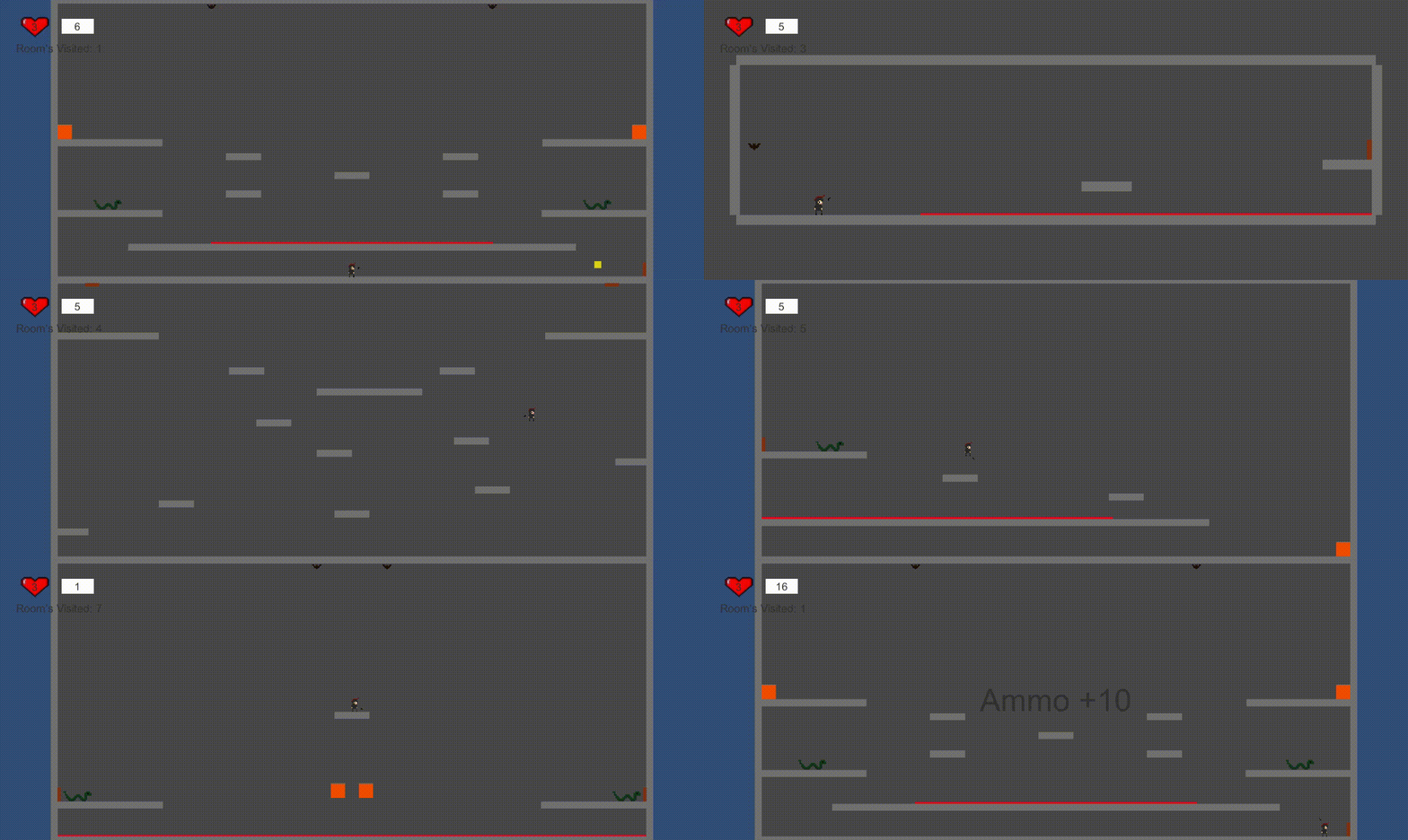
Here is my final product showcasing off all of the gameplay mechanics and how they work within the game. Whilst not every room or item is showcased a good few are. The rest can be found within the reflective journal. I am proud of how the game looks and plays and believe it lives up to what was outlined within my project's proposal.